Sp5der Kakobuy Spreadsheet
Use this Sp5der page when you want to narrow Kakobuy Spreadsheet results to a particular type of item, rather than browse by brand name alone. For graphic hoodies, sweatpants and streetwear sets, the most useful visual checks are puff-print scale/placement, web/flower graphic details, ribbing and actual garment measurements. Confirm the product title, selected variant and measurements before relying on a match.
Browse Sp5der products


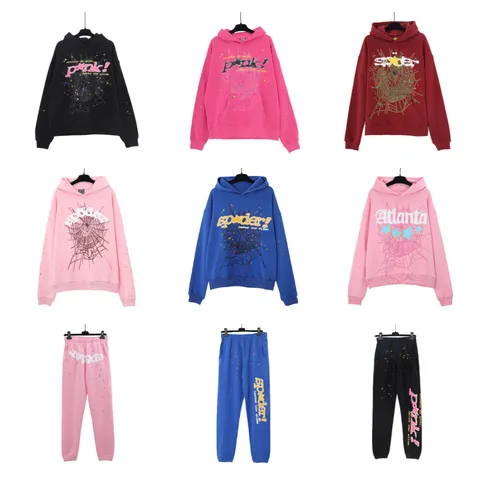
Sp5der Web Graphic Pullover Hoodies — Multiple Colorways


Try a wider search.
Remove a filter or browse the complete catalog.
Kakobuy Sp5der Spreadsheet
Build a more precise Sp5der search
Search by the most specific phrase available: graphic hoodies, sweatpants and streetwear sets, a named model, colourway, collaboration or product line. Compare full titles before opening several results; broad brand matches can point to different product types or versions.
Separate appearance from product facts
For Sp5der, first inspect puff-print scale/placement, web/flower graphic details, ribbing and actual garment measurements. Keep the comparison within the same item category and, when possible, the same model. Use photos to compare visible shape, graphics and placement. For construction, material composition and performance, also review the listing specifications and measurements; photos are one useful part of the decision.
Keep the final check item-specific
Use puff-print scale/placement, web/flower graphic details, ribbing and actual garment measurements as a comparison checklist, then confirm the exact size or measurements, selected colour/variant and stated material on the product page. If a detail or included component is missing, leave it unconfirmed rather than borrowing information from another model.
Available categories
- T-Shirts5 products
- Hoodies & Sweaters4 products
- Hoodies4 products
- Sets3 products
- Matching Sets3 products
- Graphic Tees1 products
What to check before continuing to Kakobuy
This collection contains 12 published finds for Sp5der. Compare the title, main image, product type, visible details and any size or variant data recorded on the individual listing.
Practical collection notes
The catalogue is organised around individual listings rather than a promise to cover an entire brand. Use the visible Sp5der results to discover what is present, then check the selected product page for details that apply to that exact entry.
For a meaningful comparison, separate visible details from claims that need documentation. Check puff-print scale/placement, web/flower graphic details, ribbing and actual garment measurements in the photos and title, then use the product page for measurements, material statements and included pieces. No brand-level rule replaces those item-level facts.
The live Kakobuy Spreadsheet grid shows the Sp5der entries currently available to browse here, not every release sold elsewhere. When comparing options, keep the selected product page for details that apply to that exact entry in view and verify the exact listing rather than relying on a similarly named item.
Shopping Sp5der
How can I make a more precise Sp5der search?
Add an item category, model, colour or collaboration to the brand name. For graphic hoodies, sweatpants and streetwear sets, compare the item title and photos before checking individual specifications.
Why check the exact Sp5der model before comparing listings?
Different versions can share a brand name while differing in product details. For Sp5der, compare the selected product page for details that apply to that exact entry, then confirm the model and variant on the specific listing.
What if a Sp5der listing leaves key details unclear?
Keep the missing information unconfirmed. For Sp5der, check the exact listing for the selected product page for details that apply to that exact entry and any available measurements or additional photos. Do not transfer details from another seller or model.